Showing posts with label blog. Show all posts

Wednesday, March 21, 2007

How To Add AdSense

After you have registered as member for Google AdSense, you have to put in a little effort to monetize it.

Open your blog. Example (type at the address bar of your browser) http://yourname.blogspot.com

Your blog will appear. Then look at the TOP RIGHT corner of your blog.
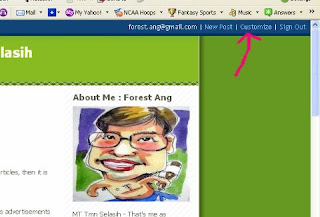

1. Sign In using your ID and password.
2. Then click on CUSTOMIZE - found beside Sign Out. (See diagram below)


3. Then click on ADD A PAGE ELEMENT. Another pop-up window will appear. If pop-up can't appear....then you need to press CTRL + clicking ADD A PAGE ELEMENT.
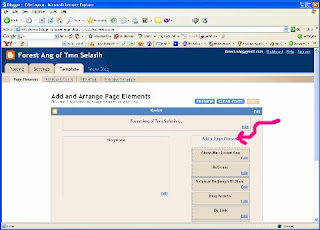


4. Find AdSense then click ADD TO BLOG.


5. Then (1) choose the FORMAT (I suggest 120X600 Vertical Banner). Then (2) choose the color so that it blends with your template. See the result instantly below. If you are happy then go down below and click SAVE CHANGES.


6. You will be back to the window ADD A PAGE ELEMENT. Here you can click and drag down to fill any location you want. Then SAVE it (Button at top right)
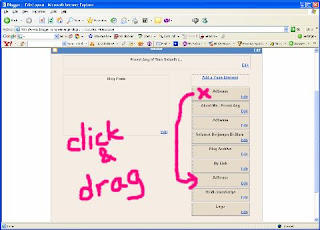

Note: The ADD A PAGE ELEMENT is an easy tools to add anything you want at any location. I have only shown you how to add AdSense here. Go and experiment with it and you will be surprised of your blog!!

Let me know if I have left anything out. Comment below this page. Thank you.

Enjoy AdSensing!
Forest Ang


How To Monetize Your Blog

Wait. Before you start, here are some questions.

Have you started your blog?
How many articles have you written?

If you have a blog now and have written about 10 articles, then it is time to apply for Google AdSense.

So what is Google AdSense?
Google AdSense belongs to Google. Google solidates advertisements from advertisers. We subsribe to the service and add the advertisement in our website. When visitors of our blog click on the advertisements, we will be paid for the clicks. You don't have to pay any dime to have Google AdSense - it's all FREE! Cheque will be sent to you after you have accumulated more than US$100.

If you are ready, click on the square banner(EARN MONEY BY SHOWING RELEVANT ADS WITH GOOGLE ADSENSE) below on the right of this page which will lead you to Google AdSense's application form. Remember it's FREE!

You need to register with your name (cheque will be sent to this name), address, your sign in ID, password, your website (ie your blog), etc. Just follow the instructions to register. Then wait.

Google AdSense will inspect your blog(or website) to confirm with their program policies. If your blog does not adhere to the policies then your website will be rejected. It is important that you are ready before you apply.

For bloggers, there are less restrictions as compare to business websites.
One important point to consider before applying - Lots of contents!

You will notice that I had Google Adsense in this blog although I had only 1 article in this blog. Actually I am already a member and I can use them on all my websites.

Don't worry, if you are rejected the first time, you can continue to apply after you have adhered to their policies. And yes, there are still other advertisers beside Google AdSense. But I love Google!

And remember - don't click on your own advertisements found in your blog, this is violation of the Program Policies.

To your success
Forest Ang

Tuesday, March 20, 2007

How To Start A Blog

What is a blog?

Blogging = online diary. You can write about anything you want - your school, your boss, your headmaster, your students, politics, hobbies and even your private love affair.

But first why do you want to blog?

1. To distribute information.
2. To discharge your energy.
3. To fulfill your passion to write.
4. To keep a diary about your thoughts.
5. To make passive earning.

Whatever your motives, I am going to teach you how to do it in simple and easy to understand guide. Yes, you can start a blog and publish it in 5 minutes.

There are 3 popular platforms to start a blog. You can choose any platform below and it is FREE!


We will start with Blogger.com because it is easy as 1-2-3 and its by Google!


How to create a blog in 3 easy steps:


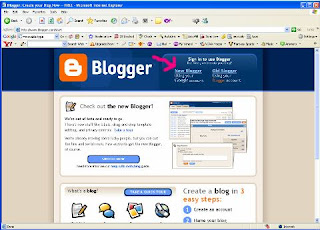
1. Create your account. Login http://www.blogger.com/ Click NEW BLOGGER.


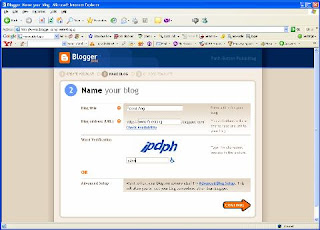
2. Name your blog. http ://<your name here>. blogspot.com (Note: No spacing allow)


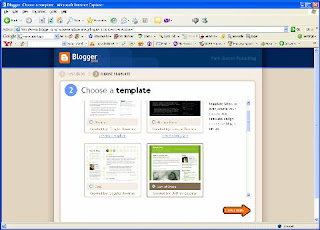
3. Choose a template. Just pilih saja the color of your choice. Don't worry you can change the template later.


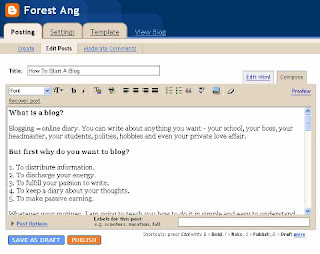
That's it - you are ready to write.

After writing and adding pictures (if any) you can click PUBLISH. Wahlah!!!!! Your blog is FINISHED.

You should continue to add as many articles to your blog before you apply for Adsense - to earn. I will write about How to Add Adsense's code in my next instalment.