How To Unprotect Word Document
Sometime you will find MS Word document that you need to edit. Or perhaps a new word document which you want to use the template for your own project. Instead of "reinventing" the format, it would save alot of time by using the document as a template. But alas, the document is protected. So? Let "unprotect" the document.
Note: Please use this on your own prerogative. I do not accept responsiblity for any violation of law.
1) Open the protected document.
2) Press Alt + Shift + F11 to launch the script editor (see below).
Note: Please use this on your own prerogative. I do not accept responsiblity for any violation of law.
1) Open the protected document.
2) Press Alt + Shift + F11 to launch the script editor (see below).
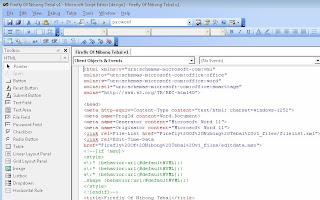
3) Press Ctl + f to find the line with the word "password" (see below).
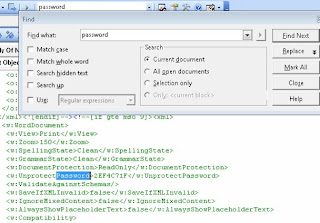
4) Delete the password (eg "2EF4C71F") between the tag "UnprotectPassword" and "/UnprotectPassword"
5) Save the script editor.
6) Close the script editor.
To open the document:
1) Click Tools --> Unprotect.
2) Your document is now Unprotected and ready for editing.

